https://docs.aws.amazon.com/serverless-application-model/latest/developerguide/serverless-getting-started-hello-world.html
## 前提条件
- [[WSL]]環境 ([[Ubuntu]])
- [[AWS SAM CLIのインストール]]が完了している
- [[AWS SAMに必要なcredentialsの設定]]が完了している
- [[Git]]がインストールされている
## 構成
- [[AWS API Gateway]]
- [[AWS Lambda]]
> 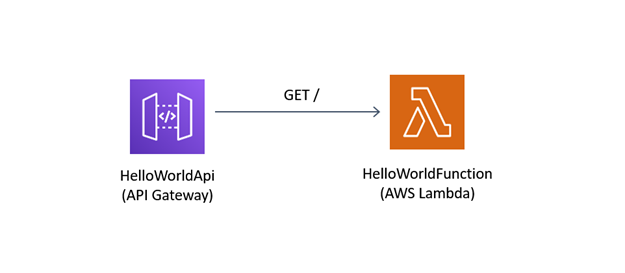
> [Tutorial: Deploying a Hello World application \- AWS Serverless Application Model](https://docs.aws.amazon.com/serverless-application-model/latest/developerguide/serverless-getting-started-hello-world.html) より
## サンプルのダウンロード
```console
$ sam init
SAM CLI now collects telemetry to better understand customer needs.
You can OPT OUT and disable telemetry collection by setting the
environment variable SAM_CLI_TELEMETRY=0 in your shell.
Thanks for your help!
Learn More: https://docs.aws.amazon.com/serverless-application-model/latest/developerguide/serverless-sam-telemetry.html
Which template source would you like to use?
1 - AWS Quick Start Templates
2 - Custom Template Location
Choice: 1
What package type would you like to use?
1 - Zip (artifact is a zip uploaded to S3)
2 - Image (artifact is an image uploaded to an ECR image repository)
Package type: 1
Which runtime would you like to use?
1 - nodejs14.x
2 - python3.9
3 - ruby2.7
4 - go1.x
5 - java11
6 - dotnetcore3.1
7 - nodejs12.x
8 - nodejs10.x
9 - python3.8
10 - python3.7
11 - python3.6
12 - python2.7
13 - ruby2.5
14 - java8.al2
15 - java8
16 - dotnetcore2.1
Runtime: 4
Project name [sam-app]:
Cloning from https://github.com/aws/aws-sam-cli-app-templates
AWS quick start application templates:
1 - Hello World Example
2 - Step Functions Sample App (Stock Trader)
Template selection: 1
-----------------------
Generating application:
-----------------------
Name: sam-app
Runtime: go1.x
Architectures: x86_64
Dependency Manager: mod
Application Template: hello-world
Output Directory: .
Next steps can be found in the README file at ./sam-app/README.md
```
中身を確認する。
```ls
$ tree sam-app
sam-app
├── hello-world
│ ├── go.mod
│ ├── go.sum
│ ├── main.go
│ └── main_test.go
├── Makefile
├── README.md
└── template.yaml
```
## ローカルでビルド
yamlパッケージでエラーが..
```console
fatal: unable to access 'https://gopkg.in/yaml.v3/': server certificate verification failed. CAfile: none CRLfile: none
go: gopkg.in/
[email protected]: unknown revision eeeca48fe776
```
[\[FIXED\] Fatal: unable to access 'https://gopkg\.in/\[…\]': server certificate verification failed\. CAfile: none CRLfile: none \- Feedback & Bug Reports \- CircleCI Discuss](https://discuss.circleci.com/t/fixed-fatal-unable-to-access-https-gopkg-in-server-certificate-verification-failed-cafile-none-crlfile-none/41416/2)
モジュールが諸々古そう..。
```console
sudo apt-get --allow-releaseinfo-change update
sudo apt upgrade -y
```
通った。。
```console
$ sam build
Building codeuri: /home/tadashi-aikawa/work/sam-app/hello-world runtime: go1.x metadata: {} architecture: x86_64 functions: ['HelloWorldFunction']
Running GoModulesBuilder:Build
Build Succeeded
Built Artifacts : .aws-sam/build
Built Template : .aws-sam/build/template.yaml
Commands you can use next
=========================
[*] Invoke Function: sam local invoke
[*] Deploy: sam deploy --guided
```
## ローカルで実行
```console
sam local start-api
```
## エンドポイントを増やす
`template.yaml`のResourcesを増やす。
```yaml:template.yaml
Resources:
HelloWorldFunction:
Type: AWS::Serverless::Function
Properties:
CodeUri: hello-world/
Handler: hello-world
Runtime: go1.x
Architectures:
- x86_64
Tracing: Active
Events:
CatchAll:
Type: Api
Properties:
Path: /hello
Method: GET
Environment:
Variables:
PARAM1: VALUE
GoodByeFunction:
Type: AWS::Serverless::Function
Properties:
CodeUri: hello-world/good-bye/ # Goのpackage構成と一致
Handler: good-bye-handler # ビルド後のバイナリ名と一致
Runtime: go1.x
Architectures:
- x86_64
Tracing: Active
Events:
CatchAll:
Type: Api
Properties:
Path: /good-bye
Method: GET
```
`hello-world/good-bye/main.go`を新たに追加。以下の構成に。
```bash
.
├── hello-world
│ ├── go.mod
│ ├── go.sum
│ ├── good-bye # GoodByeFunction.Properties.CodeUriと一致
│ │ └── main.go
│ ├── main.go
│ └── main_test.go
├── README.md
└── template.yaml
```
2つのエンドポイントそれぞれに対してビルドされる。
```console
$ sam build
Building codeuri: C:\Users\tadashi-aikawa\work\aws-sam-go-test\sam-app\hello-world runtime: go1.x metadata: {} architecture: x86_64 functions: ['HelloWorldFunction']
Running GoModulesBuilder:Build
Building codeuri: C:\Users\tadashi-aikawa\work\aws-sam-go-test\sam-app\hello-world\good-bye runtime: go1.x metadata: {} architecture: x86_64 functions: ['GoodByeFunction']
Running GoModulesBuilder:Build
Build Succeeded
Built Artifacts : .aws-sam\build
Built Template : .aws-sam\build\template.yaml
Commands you can use next
=========================
[*] Invoke Function: sam local invoke
[*] Deploy: sam deploy --guided
```
`.aws-sam`に作成される成果物を確認する。
```bash
$ tree .aws-sam
.aws-sam
├── build
│ ├── GoodByeFunction # Resourcesのkeyと一致
│ │ └── good-bye-handler # ↑の値、PropertiesのHandlerと一致
│ ├── HelloWorldFunction # Resourcesのkeyと一致
│ │ └── hello-world # ↑の値、PropertiesのHandlerと一致
│ └── template.yaml
└── build.toml
```
`template.yaml`の中身が微妙に変わっている。具体的には`CodeUri`がソースコードへのパスから`build`配下に沿ったパスになっている。
```diff:変更点の一部
Resources:
HelloWorldFunction:
Type: AWS::Serverless::Function
Properties:
- CodeUri: hello-world/
+ CodeUri: HelloWorldFunction
Handler: hello-world
```
せっかくなので`build.toml`も見てみる。
```toml:.aws-sam/build.toml
# This file is auto generated by SAM CLI build command
[function_build_definitions]
[function_build_definitions.8099352f-6423-4480-b74b-58512b2d6b92]
codeuri = "C:\\Users\\tadashi-aikawa\\work\\aws-sam-go-test\\sam-app\\hello-world"
runtime = "go1.x"
source_md5 = ""
architecture = "x86_64"
packagetype = "Zip"
functions = ["HelloWorldFunction"]
[function_build_definitions.bbe8147a-5dee-4277-9336-13dd27fc479c]
codeuri = "C:\\Users\\tadashi-aikawa\\work\\aws-sam-go-test\\sam-app\\hello-world\\good-bye"
runtime = "go1.x"
source_md5 = ""
architecture = "x86_64"
packagetype = "Zip"
functions = ["GoodByeFunction"]
[layer_build_definitions]
```